Category Archives: Technology

Will iBooks Textbooks Extend the Reach of Historic Sites?

iBook textbook on an iPad. Image courtesy of Apple, Inc.

Today at the historic Guggenheim Museum in New York, Apple announced an expansion of their iBooks app to include textbooks for their iPads.  Students will no longer have to lug around heavy books, content will be always be current, and it will cost less.  As Apple describes it:

A Multi-Touch textbook on iPad is a gorgeous, full-screen experience full of interactive diagrams, photos, and videos. No longer limited to static pictures to illustrate the text, now students can dive into an image with interactive captions, rotate a 3D object, or have the answer spring to life in a chapter review. They can flip through a book by simply sliding a finger along the bottom of the screen. Highlighting text, taking notes, searching for content, and finding definitions in the glossary are just as easy. And with all their books on a single iPad, students will have no problem carrying them wherever they go.

They’ve already partnered with Houghton Mifflin Harcourt, Pearson, and McGraw Hill to produce textbooks on math and science.  With the big publishers in play, what’s in it for historic sites and history organizations? A lot. Continue reading

Pine Point: Interpreting a Vanished Town

Pine Point, an interactive Web documentary by The Goggles.

Last week I had a chance to visit Bill Adair, director of the Heritage Philadelphia Program and one of the co-authors of the new book, Letting Go?:  Sharing Historical Authority in a User-Generated World.  As usual, we had a wide ranging discussion which included his interest in the work of The Goggles, an award-winning Canadian design group headed by Paul Shoebridge and Michael Simons.  He was particularly taken by “Pine Point,” an interactive web documentary about a northern mining town that closed in 1988 and was demolished.  Through oral histories, documents, video, and artifacts, the story of this ghost town is told in a mesmerizing scrapbook style.  If you’re looking for a way to interpret a place in a new way on the Web, this might provide some inspiration.

2012 WebWise Conference Registration Is Open

Registration is now open for the Institute of Museum and Library Services’ (IMLS) WebWise Conference, which will take place February 29th-March 2nd at the Renaissance Baltimore Harborplace in Baltimore, MD. Today conference organizers announced that actor and literacy champion LeVar Burton has been chosen as one of the keynote speakers. Burton will speak on the morning of March 1.

A signature initiative of IMLS, the WebWise Conference annually brings together representatives of museums, libraries, archives, systems science, education, and other fields to explore the many opportunities made possible by digital technologies. George Mason University’s Roy Rosenzweig Center for History and New Media (CHNM), partnering with the Balboa Park Online Collaborative (BPOC), is helping to organize the conference.  Historic sites and historic house museums are rarely in attendance, but this is a great conference so I’ll share what I’ve learned on this blog. Continue reading

Take Advantage of the Ten Cultural Trends for 2012

JWT Intelligence has just released its Ten Trends for 2012 based on surveys of Americans and Britons and interviews with experts and influencers.  If you can’t afford to buy copy of their full report for $250, here’s a summary plus some suggestions for taking advantage of them:

  1. Navigating the New Normal:  The economy won’t be back to the way it was for some time, so consumers are now becoming price conscious by habit.  Consider stripped down offerings (such as smaller sizes of products in your museum store) or some access at lower cost (such as a “grounds only” admission fee).
  2. Live a Little:  Although they don’t want to pay a lot, visitors are becoming anxious to splurge on a few good things responsibly.  Adjust your programs so they promote both the fun experience and extraordinary aspects of your site (and be sure you can deliver it–just saying your tours are fun and extraordinary doesn’t make it so).
  3. Generation Go:  20-somethings are struggling Continue reading

Latest Trends in Mobile Computing

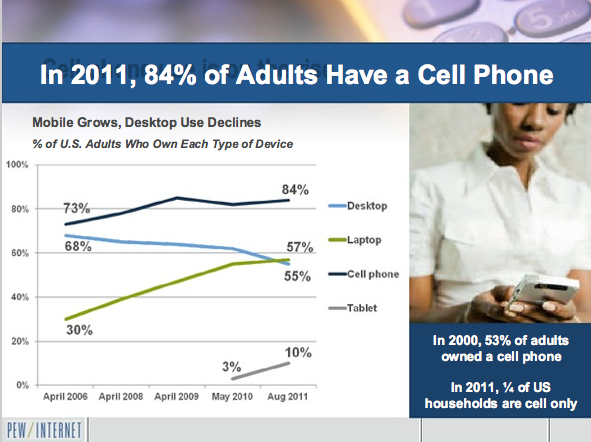
According to a recent survey by the Pew Internet and American Life Project, 84% of American adults have a cell phone and laptop and desktop use are about the same.

Aaron Smith, senior research specialist at the Pew Internet and American Life Project, recently released the key trends on Americans and mobile computing based on a nationwide telephone survey.  You can find the entire presentation online but some highlights for historic sites and historic house museums are:

  1. The use of mobile devices (cell phones, laptop computers, and tablets) is growing and desktop computer use is falling.  About 2/3rds of Americans connect to the internet wirelessly using a laptop or handheld device.  One quarter of US households only use cell phones.  [Soon everyone will be carrying an internet-connected computer with them–what will that mean for your organization?  How will that change your communications strategy, your programs and activities?]
  2. Smartphones (cell phones with internet access) are most popular with people ages 18-29, college graduates, households with an annual income $75,000 or more, and African Americans and Latinos.  [If you are trying to reach one of these audiences, Continue reading

Flat Stanley Goes Mobile; Will He Visit Your Site?

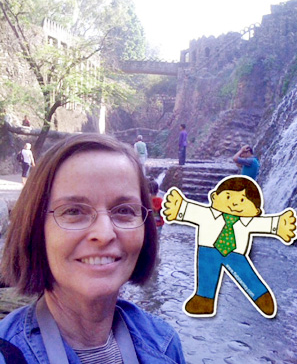
Flat Stanley with Suzie Boss in India. From Edutopia.org.

“Flat Stanley,” the elementary school activity that’s designed to get students to explore places around the world, has moved from a paper-cutout to a clever smartphone application.  He can now be integrated into a phone’s camera to be part of photos taken in places visited by children–the result of some clever computer programming and a legal agreement with the estate of the author.  Read more at Suzie Boss’ blog at Edutopia.org.

Apps Students Want

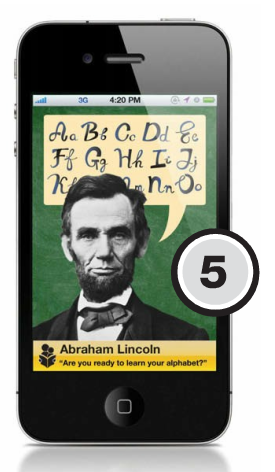
Artist's rendition of "The Past Speaks to Us" mobile app. From THE Journal.

Project Tomorrow asked students from kindergarten through high school to imagine their ideal mobile app for learning.  They received more than 200,000 responses and T.H.E. Journal highlighted fifteen of them that could transform student learning and take advantage of this budding technology in their November/December 2011 issue.  For museums and historic sites, here are the ones with most potential (as well as what’s happening currently in the field):

  • The Real Thing.  Suggested by a sixth grader in California:  “Some students have a hard time with subjects but they don’t want to ask teachers.  This app would let them watch videos or talk to real professionals about the subjects they are learning in school.”  Some institutions are already offering YouTube videos like this to explain the job of a curator or an expert’s view on a topic.
  • iMu-see-’em.  Suggested by an eighth grader in New Jersey:  “This app is at once a virtual planner, information database, and textbook archives.  It includes a three-dimensional model viewer for referencing subjects, like Continue reading

What’s Next in the Social Media Revolution?

"What's Next for Social Media" Forum at the National Archives.

The National Archives brought together a diverse panel of practitioners and critics of social media to discuss some of the challenges and opportunities for communication with the public in, “What’s Next in the Social Media Revolution?” at its Seventh Annual William G. McGowan Forum on Communications on Friday, November 4.  A really informative (and free!) evening and for historic sites there were these particularly useful insights and recommendations:

  • Social media is not just for socializing, but can inform and motivate. Alex Howard, the Government 2.0 Correspondent for O’Reilly Media, provided a quick history of social media noting that many of them are very new (Flickr, Facebook, LinkedIn, Digg launched in 2004; YouTube and Twitter in 2006) but the turning point was the Iran elections in 2009, which showed that the use of social media could have tremendous impacts on society.  My advice:  your organization may not have the capacity to use social media actively right now, but Continue reading

National Archives to Launch Dashboard to Engage Users

Pamela Wright of the National Archives describes the forthcoming Citizen Archivist Dashboard.

At the Seventh Annual William G. McGowan Forum on Communications on November 4, the National Archives previewed their Citizen Archivist Dashboard, a single place where users can actively participate in the work of the institution (the Archivist of the United States debuted it earlier in his blog). Pamela Wright, Chief Digital Access Strategist at the National Archives, stated that this would be a way to develop deeper levels of engagement with its users beyond the basic performance measures of “likes” and “followers”. Scheduled to launch in December, it will use crowd-sourcing strategies to improve access and understanding of its enormous collections by allowing visitors to: Continue reading

Claim Your Space on Google+ Pages

Yesterday, Google launched Google+ Pages worldwide, which expands their network from people to places.  Now historic sites, museums, galleries, organizations,  associations, and even advocacy campaigns can have a Page in Google+.  It’s similar to Facebook, but you have access to such Google+ features as:

  • email distribution lists (called Circles), which can help you build special interest groups around your collections or programs
  • group video chats (called Hangouts), which can help you hold meetings for up to 9 people
  • sending text messages as a group chat (called Messenger), handy if you’re coordinating a large event and need to communicate with everyone quickly.

Likewise, your members, users, and supporters will be able to more easily connect with you by adding you to their Circles, plus they can recommend your content on Google Search.

A number of pages are already available (Save the Children, Anderson Cooper 360, The All-American Rejects), but any organization will be able to join the community at plus.google.com/pages/create.  I’ve just created a Google+ Page for Engaging Places, but it’ll be fairly quiet until I better understand the possibilities (but I wanted to reserve my name before someone else takes it).